

The sheer volume of scam emails has increased over the years and the level of sophistication in them also often defeats the mechanisms we use to protect ourselves. Here is a tip for how you can spot one.
This came in this morning. It looks real enough.

These are designed to look genuine and create panic. While I do have an Office 365 subscription, this is not it. It occurs at a different time of the year. What is unusual about this one is there is no link anywhere. But the hook is in the text Implementation Assistance where it lists a telephone number. It is listed twice.
What do you do?
In my case I am going to hit the reply button BUT NOT SEND IT. If I do that the following is revealed:
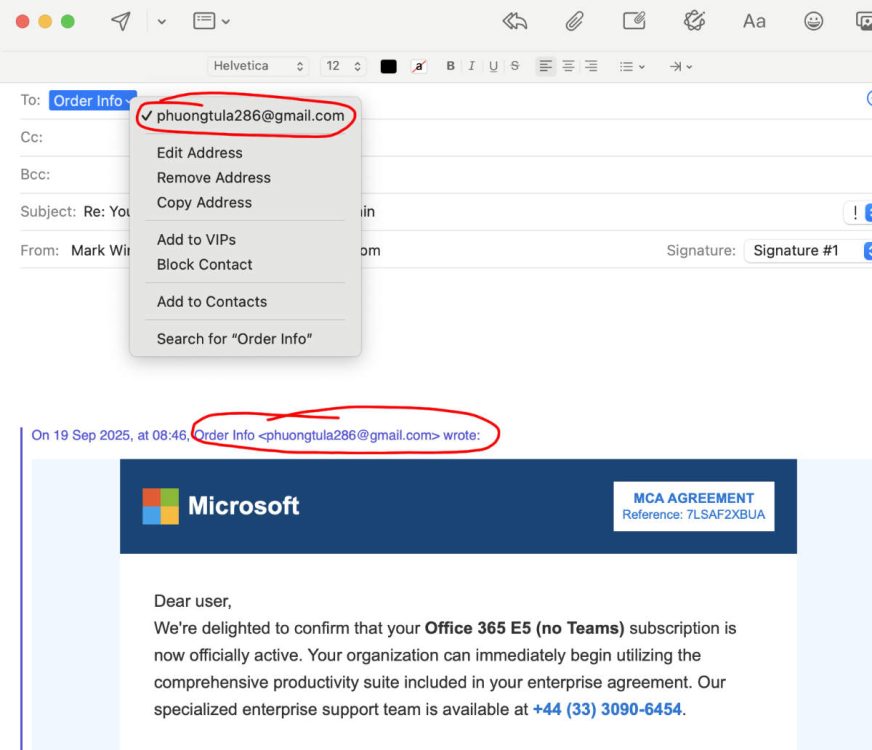
What you are looking at is a MAC Mail screenshot, Outlook is better because it will make the return address very obvious, on Apple systems including iPhones you need to touch or click on the return address to expose it.
Here we can see that the message never originated from Microsoft at all. it came from a gmail account. I am pretty sure Microsoft are not now using Gmail for their communications.
Speculating….
I would guess that the way this scam works is you ring the number, you will be very demanding as a customer, and point out that an error has been made. They will agree with you (which of course you were not expecting), and agree to process a refund to your bank account. Of course that means you will have to tell them your bank account details so they can make the refund.
If you have watched some of the YouTube videos that reference this type of scam, they end up taking over your computer remotely, and can manipulate your bank account details live while you are looking at them to indicate that they have credited a lot more than the amount listed here. They do this in the web browser you are looking at. It is not real.
You are then shocked at the error and obviously wish to correct it, so you pay them back the excess, and that is how they make their money. Your account was never credited in the first place.
Are you being scammed?
If you receive something that looks remotely suspicious, even if it has come from a friend or colleague. The first thing to do is not panic. Scammers rely on you panicking and not thinking clearly. Look for ways to establish authenticity without contacting the senders via email or any information in their message. I did that quite easily here.
If the email address had appeared to be genuine, the next thing I would have done is INDEPENDENTLY locate my account details and login to my Microsoft account to see what has happened. I would not follow any links or instructions in an email that is regarded as suspicious.
Independently contacting Microsoft support would have quickly established that this is a scam as well.
Checking the IP address of the sender
The IP address is the address of a computer attached to the internet, think of it like a street address. But they are not always accurate, just use it as a guide. You can find this information in an email header. These are not always easily accessible in mail programs.
This does not always work well, but can also give you a sense of where it originated. In the header of the email it contains a lot of meta data about the message. In this case the mail originated from this 209.85.222.196 which is located in North Carolina, USA. While that is just a node in the Google Network with many users on it, if we check with Abuse IP Database we can see that there have been 710 other instances coming through that IP address. 89% confidence that it is a scam or abuse source. (Follow this link to see the AbuseIPDB for this IP address. Link will open in a new window, this website lists IP addresses and their reputation.)
Take care with anything on the internet, if it looks too good to be true, it probably is. Don’t be rushed or pressured into taking any action if it does not feel right. Seek the help of colleagues and friends. Check independent sources of information about the sender or service, and contact any companies through those independent searches. Never do it through the original email.
Recent Comments